There are great features in MySQL 5.6. But not only that. We also
tried to correct some old behaviors and limitations which, over
the years, have shown to irritate our Community. The behavior of
TIMESTAMP columns is one of them.
My colleague Martin Hansson did most of the work and summarized
it well in his blog. Thanks to him, since MySQL 5.6.5, it's
possible to declare more than one TIMESTAMP column with the
DEFAULT CURRENT_TIMESTAMP or ON UPDATE CURRENT_TIMESTAMP
attributes. And it's possible to have DATETIME columns with such
attributes. Two limitations lifted!
But that is not the end of the story. TIMESTAMP was still
special. Unlike other datatypes, if not declared with the NULL or
NOT NULL attributes, it would automatically get NOT NULL. And the
first TIMESTAMP column of the table would automatically …
The latest from the MySQL community
Ideas, releases, practical guides, and perspectives from the people building with MySQL.
I am very excited and thrilled to use the latest release of MySQL 5.6 in production. This is probably the most notable and innovative release in many years, if not ever.
During the last year, we had the chance to work with many new features and test the fixes to old issues. To be honest, I was expecting to have MySQL 5.6 GA before now, and I even wagered with my colleague Francisco that it would be out before the end of 2012. It was nothing special, just a beer in the Santa Clara Hyatt lounge. Unfortunately for me, MySQL 5.6 is now in GA and given that it happened in 2013, I lost the bet and now have to pay for that beer. But I have also lost the full list of things that we saw as relevant, interesting, or really innovative for MySQL.
So I took a step back, took some time, and reviewed what Oracle delivered in this new MySQL release.
Short premise
Oracle developer teams did great work for …
[Read more]A high-level comparative overview of the features
With the recent GA release of MySQL 5.6, there have been a lot of questions about where MariaDB stands with regards to MySQL 5.6. SkySQL will of course support both as Patrik explained in his recent blog post, but there are many questions about the technical differences. Rasmus from Monty Program gave a detailed view on MariaDB 10.0 here but I thought it would be beneficial to share a comparison table of the two. MariaDB recently released a benchmark including various versions of both MariaDB and MySQL (as did DmitriK from Oracle), but this post will focus solely on features (not …
[Read more]
It’s time to unveil the winners of the [Plus] readers
choice awards!
Thank you again for your votes, remember that the real winner was
the community, again.
I asked you to vote for what you used in 2012 and you’ve voted
with your heart.
Here are the final results, congrats to the lucky guys and teams
:
The most useful blogs in 2012 :
Ok, the Percona team members provides the best technical blog
about MySQL (and more), this year again. Of course, this
blog is very useful and interesting, I recommend to read the
comments too, they are often very informative.
There is a …
When MySQL gets a query, it is the job of the optimizer to find
the cheapest way to execute that query. Decisions include access
method (range access, table scan, index lookup etc), join order,
sorting strategy etc. If we simplify a bit, the optimizer first
identifies the different ways to access each table and calculate
their cost. After that, the join order is decided.
However, some access methods can only be considered after the
join order has been decided and therefore gets special treatment
in the MySQL optimizer. For join conditions, e.g. "WHERE
table1.col1 = table2.col2", index lookup can only be used
in table2 if table1 is earlier in the join sequence. Another
class of access methods is only meaningful for tables that are
first in the join order. An example is queries with ORDER BY ...
LIMIT. Prior to MySQL 5.6.10 there was a bug in MySQL that made
the optimizer choose inefficient execution plans for this query
type. …
Get up-to-date on MariaDB, MySQL, Cloud Databases and SkySQL’s expertise: whitepapers and presentations now available on skysql.com
Tuesday, February 5th was an important day in the MySQL ecosystem due to the release by Oracle of the long-awaited MySQL 5.6 GA. Many MySQL users have been looking forward to this release in order to benefit from the improved performance and scalability. Features such as online operations/schema changes, NoSQL access from memcached to InnoDB, multi threaded-replication and Global Transaction ID significantly improve the competitiveness of MySQL.
With MySQL 5.6 just gone GA, I thought it would be good to take a look at the changes in options and variables that comes with the new release.
First of all, several of the existing options have get new default values. As James Day already have written a good post about that in his blog, I will refer to that instead of going through the changes. For a general overview of the new features and improvements, the recent blogs by Rob Young and Peter Saitsev are good starting points together with the …
[Read more]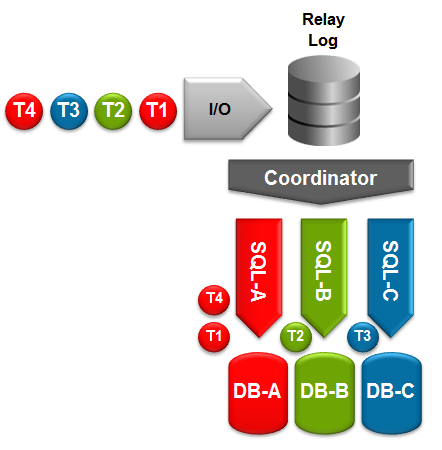
Multi-Threaded Slave
MySQL 5.6 has now been declared Generally Available (i.e. suitable for production use). This is a very exciting release from a MySQL replication perspective with some big new features. These include:
- Global Transaction Identifiers (GTIDs) – a unique identifier that is used accross your replication topology to identify a transaction. Makes setting up and managing your cluster (including the promotion of a new master) far simpler and more reliable.
- Multi-threaded slaves (MTS) – Increases the performance of replication on the slave; different threads will handle applying events to different databases.
- Binary Log Group Commit – Improves replication performance on the master.
- …
There are many good things in the upcoming MySQL 5.6 release. One
thing that caught my eye early on was the ability to start the
server with InnoDB set to a read only mode.
A few months ago Todd Farmer wrote about this ability from
the perspective of setting up an instance on read-only media
(InnoDB now works with read-only media). And I
encourage you to read that post first.
I decided to test this from a data warehouse perspective (as
Sunny Bains points out in a comment to Todd's post). I used
machines I have available: 1 OL6 desktop running 5.6.9 and 1
MacBook Pro running 10.8.
First thing to try was adding the innodb_read_only parameter to
the config file on an instance I already had running on the Linux
box. My setting:
[mysqld]
user = mysql
port = 5602
…