MySQL Shell is a powerful tool. It allows Javascript,
Python and SQL access to MySQL.
Usage of MySQL Shell can be
1. As admin tool to MySQL Server
2. As Scripting Engine to run Javascript or Python or SQL to
access MySQL Server
3. As a tools to allow Document Store access (like collection
API) with MySQL Server
4. As MySQL InnoDB Cluster admin Tooling
Customization and extensible framework is essential to a tool as
such DB administrators can create customized report and extension
to do the daily job.
This tutorial is written to provide a short summary how we can
create a MySQL Shell Report in Python.
What is MySQL Shell Report
MySQL Shell report can be executed thru "\show"
There are 3 'report's coming with MySQL Shell - namely
'query', 'thread', 'threads'.
Query Report :
Getting the "help" …
It’s the in-between term time and we’re all stuck at home. I decided to update the image for my Fedora 30 virtual machine. I had a work around to the update issue that I had encountered last October in Bug #96969 but it was not required with the current version. However, after updating from MySQL 8.0.17 to MySQL 8.0.19, I found that my Java connection example failed.
The $CLASSPATH value was correct:
/usr/share/java/mysql-connector-java.jar:.
The first error that I got was the my reference to MySQL JDBC driver was incorrect. The error message is quite clear:
Loading class `com.mysql.jdbc.Driver'. This is deprecated. The new driver class is `com.mysql.cj.jdbc.Driver'. The driver is automatically registered via the SPI and manual loading of the driver class is generally unnecessary.
Cannot connect to database server:
The server time zone …
[Read more]
Recently, we were affected by an ignored configuration option introduced in MySQL 5.6. This incident caused us to perform extended planning of downtime and the rebuilding of the slave. In this post, we’ll discuss our encounter with binlog_error_action and likely bad default.
The incident started with an alert from our monitoring platform that a check failed to verify a MySQL master’s binary log coordinates. My colleague working from the other side of the globe observed the following:
mysql> show master status;
Empty set (0.00 sec)

mysql> show binary logs;
ERROR 1381 (HY000): You are not using binary logging
Interestingly, the MySQL slave was still reporting that everything was okay!
mysql> show slave status\G
*************************** 1. row ***************************
               Slave_IO_State: Waiting for master to send event
                  Master_Host: master
                  Master_User: …
[Read more]
March is not only the month when a pandemic closed all borders and people had to stay home on the quarantine; it’s also the month when daylight saving time change happens. For some regions, this is not only a time change but also a switch to a different timezone. For example, New York uses EST during winter and EDT during summer. If you use the system timezone and do not restart the MySQL server or a PXC node after the switch, you may notice that the change was not implemented.
You may end up with a situation where some of your cluster nodes still use the time zone before the switch (e.g. EST) and others use the timezone after the change (e.g. EDT).
$ date
Sun Mar  8 03:03:28 EDT 2020

$ ./bin/mysql  -h127.0.0.1 -P3373 -uroot test
...
EDT node> show variables like '%zone%'; …
[Read more]
This is a three-part blog series that focuses on dealing with an unexpected high traffic event as it is happening. Part one can be found here, and part two can be found here. 13. Configure MySQL Server Properly
Complexity:Medium
Potential Impact: High
A poorly configured MySQL Server can cause severe issues, especially under high load during a traffic spike, yet getting the basics right is not that hard. While MySQL Server has more than 400 variables you can tune, you rarely need to change more than 10-20 of them to get 95% of the possible performance for your workload.
…
[Read more]By and large this would be a topic of interest for most of us including me when I started to explore this space. Before we dwell into the numbers let’s first understand some basic differences between 2 architectures. Beyond being CISC and RISC let’s look at the important differences from MySQL perspective.
- Strong vs Weak memory model (weak memory model needs proper memory barrier while writing lock-free code).
- Underlying hardware specific specialized instructions. For example: both now support crc32c hardware instructions but being low-level they are different ways to invoke them. For more differences checkout for x86-SSE/ARM-ACLE.
- Cache Line differences. Most of the ARM processors tend to use bigger cache lines (128 bytes for all caches or a mix of 64/128 bytes).
- Other sys-call level differences like: absence of PAUSE instructions with ARM and substitute instruction with very low latency …
While testing in an orchestrator lab I saw that none of my Orchestrator on-raft nodes were coming online after a reboot.
This is the status report from SystemD.
$ sudo systemctl status orchestrator
* orchestrator.service - orchestrator: MySQL replication management and visualization
   Loaded: loaded (/etc/systemd/system/orchestrator.service; enabled; vendor preset: disabled)
   Active: failed (Result: exit-code) since Fri 2020-04-03 09:30:05 UTC; 30s ago
     Docs: https://github.com/github/orchestrator
 Main PID: 957 (code=exited, status=1/FAILURE)

Apr 03 09:30:05 orchestrator-1 systemd[1]: Started orchestrator: MySQL replication management and visualization.
Apr 03 09:30:05 orchestrator-1 orchestrator[957]: 2020-04-03 09:30:05 ERROR dial tcp 127.0.0.1:3306: connect: connection refused
Apr 03 09:30:05 orchestrator-1 orchestrator[957]: 2020-04-03 09:30:05 FATAL dial tcp 127.0.0.1:3306: connect: connection refused
Apr 03 09:30:05 orchestrator-1 systemd[1]: …
[Read more]
MySQL has the inbuilt query rewritten plugin for rewrite the SQL statements which received by the server before execute them .
- Before MySQL 8.0.12 , the query rewritten plugin only supports for SELECT’s
- From MySQL 8.0.12 , the query rewritten plugin will supports for INSERT , REPLACE, UPDATE, DELETE , SELECT .
One of our customer had the performance issue with the DELETE statements for particular table . The issue was happened after the new code deployment . In this blog, I am going to explain the implementation of the MySQL query rewrite plugin and how we overcome the issue using the MySQL query rewritten plugin .
MySQL Query rewritten plugin Implementation :
MySQL provides two SQL files for the installation / Uninstallation purpose . The files will be located under the directory “lc_messages_dir”
- The …
In this blog post, we talk about the basic function and features of the Tungsten Connector.
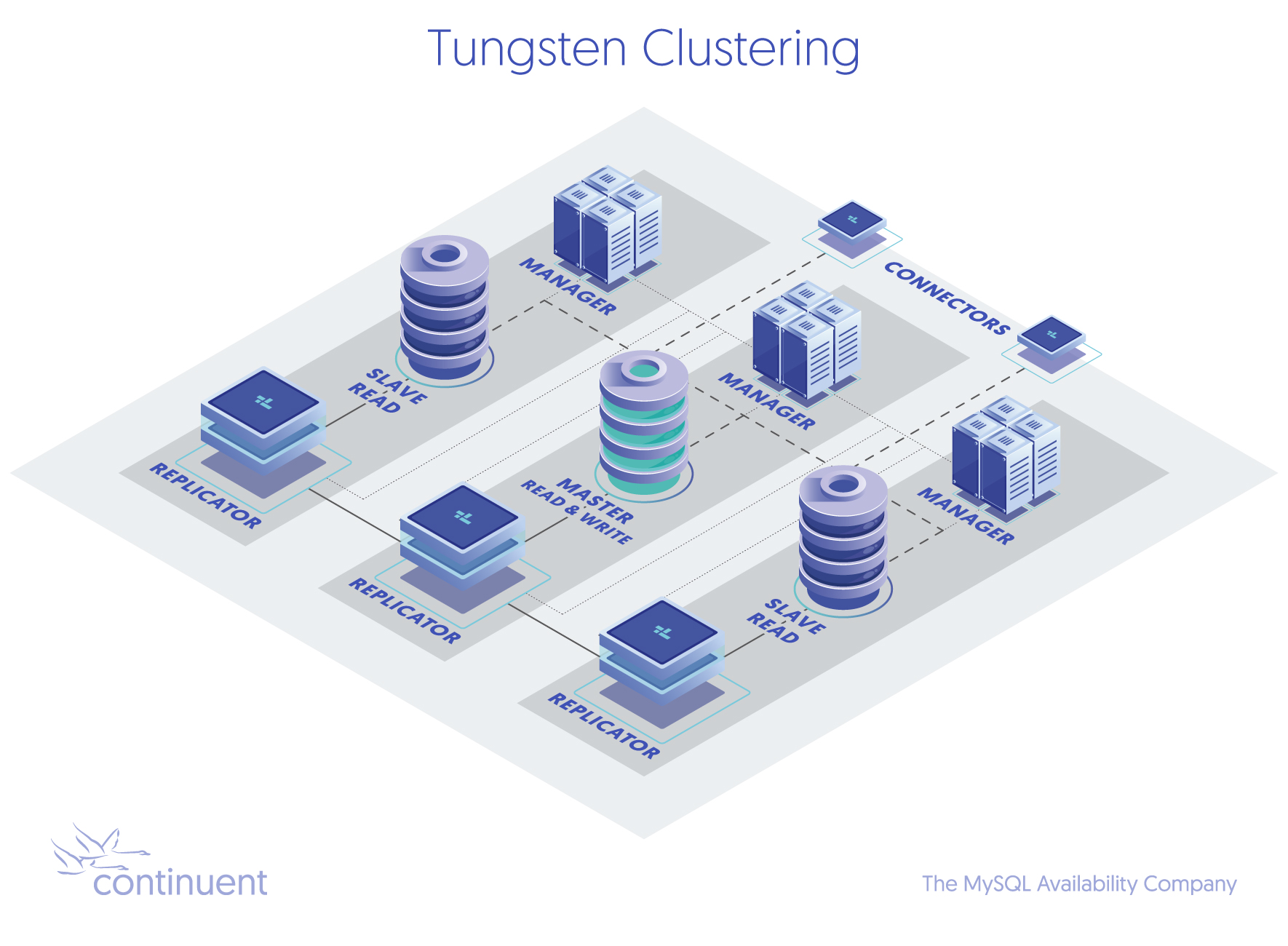
The Tungsten Connector is an intelligent MySQL proxy that provides key high-availability and read-scaling features. This includes the ability to route MySQL queries by inspecting them in-flight.
Connector Basics Understanding the Two Key Features
The most important function of the Connector is failover handling. When the cluster detects a failed master because the MySQL server port is no longer reachable, the Connectors are signaled and traffic is re-routed to the newly-elected Master node.
Next is the ability to route MySQL read-only queries to a slave (or the master, if no slave is …
[Read more]In this blog, we will test a new security feature added in ProxySQL 2.0.9. Since a time ago, we have had the ability to block queries using mysql_query_rules table matching a group of queries using reg exp like a blacklist. Check out a previous blog for how to config “ProxySQL Firewalling” using the mysql_query_rules table.
You can improve a whitelist using the mysql_query_rules table, but it is difficult if you have hundreds of queries.
ProxySQL 2.0.9 introduces two new tables for the firewall whitelist algorithm:
Admin> SELECT name AS tables FROM main.sqlite_master WHERE type='table' AND name IN ('mysql_firewall_whitelist_rules','mysql_firewall_whitelist_users') ORDER BY name;
+--------------------------------+
| tables                         | …
[Read more]