Peter Zaitsev of Percona posted a Tweet about an interactive
book Select Star SQL which 'aims to be the best place
on the internet for learning SQL'. This interactive book
uses a data set that can be downloaded or you could work the
queries online. I showed the website to a neighbor who was
asking 'what is the best way to learn SQL'. The
neighbor wanted their own copy of the data and asked how do you
turn a raw CSV file into a table.
Well, that can get complicated.
CSV
CSV files use commas to designate each field in the file.
This is a great idea until someone plants a comma in the middle
of a field but it is sort of a least common denominator way of
passing data between systems.
But a CSV file does not directly fit into a relational
table. You could …
The latest from the MySQL community
Ideas, releases, practical guides, and perspectives from the people building with MySQL.
The Performance Schema and sys schema are great for
investigating what is going on in MySQL including investigating
performance issues. In my work in MySQL Support, I have a several
times heard questions whether a peak in the InnoDB Data File
I/O – Latency graph in MySQL Enterprise Monitor (MEM) or
some values from the corresponding tables and view in the
Performance Schema and sys schema are cause for
concern. This blog will discuss what these observations means and
how to use them.
The Tables and Views Involved
…
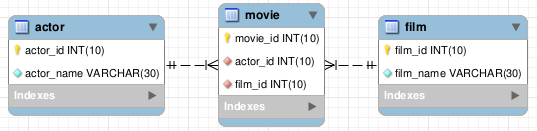
[Read more]Student questions are always interesting! They get me to think and to write. The question this time is: “How do I write a Bash Shell script to process multiple MySQL script files?” This post builds the following model (courtesy of MySQL Workbench) by using a bash shell script and MySQL script files, but there’s a disclaimer on this post. It shows both insecure and secure approaches and you should avoid the insecure ones.
It seems a quick refresher on how to use arrays in
bash shell may be helpful. While it’s essential in a
Linux environment, it’s seems not everyone masters the
bash shell.
Especially, since I checked my …
[Read more]Today, oCERT published advisory 2015-003 describing a TLS vulnerability in MySQL and derivative products. The content isn’t exactly news – it is documented legacy behavior and the subject of an earlier blog post describing how MySQL Server 5.7 solves the problem. That said, the efforts of Duo Security are certainly appreciated and welcomed – it provides a meaningful context to discuss how to properly harden existing MySQL 5.5 and 5.6 deployments, as well as frame a discussion on potential changes in these versions to increase security.
Vulnerability
The vulnerability described in the advisory relies on the legacy behavior of the client …
[Read more]
While I try to keep things simple, sometimes eliminating options
and explanations comes back to haunt me. After posting how to open a Fedora firewall port for a LAMP
stack, somebody got trapped by my instructions for installing MySQL on
Fedora. They got stuck because they had the following setting
in their /etc/my.cnf file:
bind-address=localhost.localdomain |
I’d suggested using that bind-address value for a
DHCP VMware Fedora installation in Step #7. I was trying to
create an example for an isolated testing instance, which is why
I set the bind-address to a
localhost.localdomain value. They raised the
following error when they …
I’ve been setting up a simplified lab environment to let my students learn use in class. This added content will show them how to do reverse engineering with MySQL Workbench.
It’s a complete Fedora image with MySQL and Oracle Database 11g for the course. The uncompressed image is 14GB and the compressed image is 5.3GB. I chose Fedora because it’s the smallest open source image that supports both environments, and Fedora is the closest to Red Hat and Oracle Unbreakable Linux. I’m inclined to make the instance available generally but haven’t figured out the best way to do that.
Here are the new instructions I’m adding and if you have any input leave it as a comment.
You connect as the student user, which puts you in
the /home/student directory. Once connected to the
Fedora OS, you open a Terminal session by clicking on
Activities in the upper right hand corner, and then you …
The early release of Fedora 20 disallowed installation of MySQL Workbench but the current version allows it. Almost like Tom Cruise’s Edge of Tomorrow without the drama. All you need to do is follow my earlier instructions for installing MySQL on Fedora 20. I’d check your kernel to know whether it’s supported. You can check that with this command:
<shell> uname -r |
My Fedora is at the following version:
3.14.8-200.fc20.x86_64 |
Then, you can install MySQL Workbench with yum, like
this:
<shell> sudo yum install mysql-workbench |
It generates the following log file, and if you have Oracle 11g XE …
[Read more]In the beginning was the MySQL command line and it was good. Verbose yes, error prone yes, and even tedious. But it was good. The UPDATE USER set SELECT_PRIV=’Y’, DROP_PRIV_’Y”, UPDATE_PRIV=’Y’,……,LAST_BLOODY_PRIV=’Y”; type errors have caught of us old timers. But it was still good.
Then came some GUI tools that were okay. Not great but they had their uses.
And then came MySQL Workbench. And it was very good.
Now there is MySQL Workbench 6.2 and it is excellent. It came out in Beta last week and has built on the proven success of its predecessors. All the usual stuff is there – Server Status, Users & Privileges, Startup/Shutdown, logs, Dashboard, Performance Reports and more. But there area whole bunch of subtle little tweaks that make it easier to use.
For instance, the VISUAL EXPLAIN allows toggling between the visual display and the tabular display. Plus you can now get query …
[Read more]MySQL is a proud sponsor of the Mountain Moodle Moot, July 9-11, 2014 – Helena, Montana. There will be sessions back-to-back covering query tuning, system tuning, and little known tricks using MySQL Workbench. This years Moot is already SOLD OUT.
Moodle is a learning management system and very popular with many schools across the world.
There are 3 three amazing social events planned for Friday afternoon – sponsored by Oracle/MySQL. Lunch, a tour train ride and a great social at the Blackfoot Brewery complete with tour and brews.
If you have your ticket and want me to cover anything specific in my sessions, please let me know!
MySQL’s Performance schema is a relatively new tool for measuring performance and MySQL Workbecn 6.1.2 is the latest beta of that software. I have not had a lot of time to play with performance schema but now I am taking my first steps with the help of Workbench. Startup Workbench and you will find under the Navigator an item labeled Performance Schema Setup. Flip the toggle from OFF to ON and then start exploring.

InnoDB Buffer stats by Schema are show here — one of more than twenty pre-established metrics available.
Now you can run queries and see what the costs are, where the server is waiting, or what indexes remain unused. You can even use workbench to alter the options file to setup other Performance Schema instruments. Trying various settings for optimizer_search_depth is simple with the …
[Read more]