Overview MySQL supports Stored Programs since 5.0, where they
were introduced in a very draft stage. A "Stored Program" is
a general term for stored procedures, stored functions,
triggers and events. Since then stored program support has
been gradually improved. Another major milestone is coming
in the 5.6 release. We have finally fixed the infamous
problem that Stored Programs could not detect metadata
changes!
Let's consider a simple example:
> CREATE TABLE t1(a INT);
> CREATE PROCEDURE p1()
SELECT * FROM t1;
At this point the p1 definition is stored in the data
dictionary (mysql.proc internal table).
> CALL p1();
Now, p1 is loaded from the data dictionary, parsed into an
internal representation and cached within the server.
p1 can now be called several …
"Life is", goes a saying in my native Finland, a country not known for using superfluous words. While this saying may take compactness a tad too far, it's a great way to say "things happen", mostly to stoically adapt, sometimes to justify actions taken in order to adapt. The brevity of the expression adds not just to the perceived wisdom, but also makes resistance futile. The expected and usual reaction is agreement; I have yet to experience a situation where somebody would counterargue that "life is not".
Monitoring MySQL servers is no rocket science provided you know what to monitor. MySQL gives a comprehensive list of variables to check your server’s health and performance. Let me walk you through the crucial variables you should be monitoring. Lets assume that you have one or more MySQL servers, which have been setup and running fine. Here are the top 10 things to monitor on your MySQL.
1. MySQL availability
Yes, this is the first thing you should be looking at!
It would not make sense to monitor your MySQL if its not even
available. MySQL downtime is simply not acceptable in production.
At the same time ensuring zero downtime does not guarantee
maximum performance.
You can execute
-mysqladmin -h 192.168.1.95 -u root -p status
to know if MySQL is running or you can just ping MySQL using service mysqld status if you are using RedHat Linux.
2. Presence of insecure users and …
[Read more]
While staging to rebuild the Oracle DB Console (Oracle Enterprise
Manager – OEM), I needed to check something in my MySQL instance
and ran into the following error after changing the machine’s
hostname for that OEM test. The message basically
says that MySQL Workbench can’t resolve the connection.
The dialog error provides an excellent note, which lists the actual error as the first thing to check. The dialog follows:
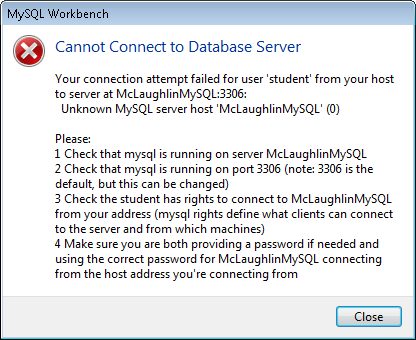
This lists the text of the error dialog:
      Your connection attempt failed for user '<user_name>' from your host to server at <server_name>:3306:
  Unknown MySQL server host '<server_name>' (0)

Please:
1 Check that mysql is running on server <server_name>
2 Check that mysql is running on port 3306 (note: 3306 is … |
If you’ve ever been troubleshooting on the MySQL command line and needed to quickly see how much memory is being used then you’ve probably noticed that there are no built in commands to give you this data. Unlike other enterprise databases MySQL doesn’t have a very robust management system built in to help make the DBA’s life easier. It doesn’t come with built in Stored Procedures to report on usage statistics or generate handy reports; so we have to code them and import them to MySQL — no relying on Oracle to help us out here.
So, here’s a stored procedure that can be imported to MySQL and run whenever you need to see the memory usage statistics. Installation and usage info is built into the SP below. The SP can also be downloaded from the repo: https://bitbucket.org/themattreid/generic-sql-scripts/src/15c75632f1af/mysql-memory-report-storedproc.sql
##################################################################### …[Read more]
This Log Buffer Edition is encompassing various blogs across Oracle, SQL Server and MySQL arena. Enjoy the Log Buffer #284. Oracle: Dimitrios Stasinopoulos was trying to install new Guest Additions to VirtualBox4.1.14 to 4.1.18 and all of a sudden…. Denes Kubicek has a good blog post about APEX 4.2. Jonathan Lewis blogs about the bugs [...]
When you have a non-trivial database installation, you will inevitably sooner or later encounter performance related issues ranging from a query not executing as fast as desirable to complete meltdowns where the database does not respond at all.
Until MySQL 5.5 the tools available to investigate what is going on inside MySQL were somewhat limited. Some of the tools were:
- The slow and general query logs
- The status counters available through SHOW [SESSION|GLOBAL] STATUS
- Storage engine status, e.g. SHOW ENGINE INNODB STATUS
- The EXPLAIN command to investigate the query plan of a SELECT statement
- SHOW PROFILE to profile one or more queries
- The MySQL error log
All of these tools are very useful, but also have their limitations, for example the SHOW STATUS mainly consists of counters that does not provide much insight into what is happening …
[Read more]
Now that forge.mysql.com is shutdown the protocol
documentation found a new/old home at:
http://dev.mysql.com/doc/internals/en/client-server-protocol.html
It documents the early days of MySQL 3.20 as seen
in:
- Protocol V9 (used by MySQL 3.20 and later)
up to the features added MySQL 5.6.x:
…[Read more]
Now that forge.mysql.com is shutdown the protocol
documentation found a new/old home at:
http://dev.mysql.com/doc/internals/en/client-server-protocol.html
It documents the early days of MySQL 3.20 as seen
in:
- Protocol V9 (used by MySQL 3.20 and later)
up to the features added MySQL 5.6.x:
…[Read more]Creating Simple Virtual Hosts With mod_mysql_vhost On Lighttpd (Ubuntu 12.04)
This guide explains how you can use mod_mysql_vhost to create simple virtual hosts on a lighttpd web server on Ubuntu 12.04. With mod_mysql_vhost, lighttpd can read the vhost configuration from a MySQL database. Currently, you can store the domain and the document root in the MySQL database which results in very simple virtual hosts. If you need more directives for your vhosts, you'd have to configure them in the global section of lighttpd.conf, which means they'd be valid for all vhosts. Therefore, mod_mysql_vhost is ideal if your vhosts differ only in the domain and document root.