There was an interesting but hard to read post on StackOverflow about how 'insert select delete'
data from a MySQL JSON data type column. The first line of
the writer's problem is a little confusing '
In order to record user mac_address and count mac_address to
restrict user login's pc or notebook to control user available
max for example (it's work)' but the examples reveled more
about what was desired. The idea was to track MAC address used by
various users and the author of the question was wondering how to
up data a JSON Array of values with JSON_INSERT. INSERT is
for inserting and the better choice would be JSON_ARRAY_APPEND or
JSON_ARRAY_INSERT. But what caught my eye was the
second question: Select sql command for json column ? could be …
As you know, one of the great new feature in MySQL 8.0 is the Document Store. Now with MySQL you can store your JSON documents in collections and manage them using CRUD operations. NoSQL is now part of MySQL ! Instead of a mix of MongoDB and MySQL, now you can eliminate MongoDB and consolidate with MySQL !
This is a historical meeting of NoSQL and SQL in the same database server!
To use MySQL 8.0 as Document Store, you need to have the X plugin installed (by default since 8.0.11). This plugin enables the X DevAPI that offers a modern programming interface. Clients that communicate with a …
[Read more]
Last time I was stumped by the MongoDB $gt:
operator. I wanted to look for restaurants in a certain
Manhattan burough OR in a zipcode greater than a certain
zipcode. Well, I was getting different results between
Mongo and MySQL.
To > or Not To >, That Is the Query
Lets say we have three records with the same key but the values
are 1, 2, and "3". Yup, you got it two numerics and one
string. I would expect schema less data to be free flowing,
not typed, and pretty much a free for all. Whoops. Bad
assumption on my part for Mongo use.
I added three JSON documents into Mongo as can be seen
below:
| Our three documents with the values of 1, 2, & … |

Next week I will be speaking at DataOps in Barcelona about MySQL 8.0 Document Store. If you don’t know it yet, I really invite you to join this talk, you will be very surprised about all MysQL can do in the NoSQL world !
There will be also a lot other MySQL related sessions by many good speakers of the MySQL Community.
As I will be in Barcelona, the Barcelona MySQL Meetup invited me to give a session about MySQL InnoDB Cluster and Group Replication and I will also share the stage with my friend and colleague …
[Read more]
Last time we looked at moving a JSON data set from MongoDB to the
MySQL Document Store. Let's move another and then see how
to investigate this date. We will use the
primer-dataset.json that contains data on restaurants around New
York City.
Loading Data
The loading of the JSON data set was covered last time but here
is the gist. The first step is to fire up the MySQL Shell and
login to the server.
| Here a new schema is created and then a new collection |
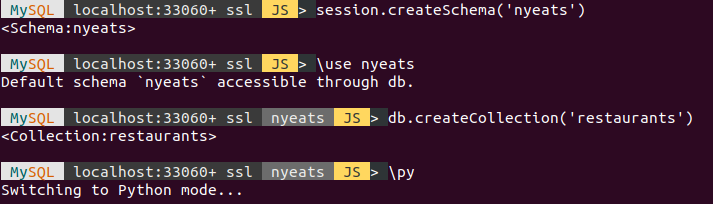
We need a new schema for this data and the example shows
one created as nyeats. The within that new schema a
collection is created with the name restaurants.
…
Porting data from MongoDB to the MySQL Document Store is very
easy. The example I will use is an example data set from
the good folks at Mongo named zips.json that contains
a list of US Postal Codes and can be found at http://media.mongodb.org/zips.json for
your downloading pleasure.
I copied the file into the Downloads directory on my Unbuntu
laptop and then fired up the new MySQL Shell. After login,
I created a new schema creatively named zips with
session.createSchema('zips'). When then set the
db object to this new schema with the command \use
zips.
| … |
From June 16th to 17th, the MySQL Team will be attending and speaking at the Hong Kong Open Source Conference 2018.
Unfortunately I won’t be present but some of my great colleagues will be speaking about MySQL.
If you are planning to attend HKOSCon2018, don’t miss their talks:
[Read more]
My book MySQL and JSON - A Practical
Programming Guide is now available! My promotional copies
have arrived and I will be bringing them to PHP Tek, SyntaxCon,
and Southeast Linuxfest in the next two weeks.
This is a book on discovering how to use JSON with MySQL with
lots of examples, samples programs, and more. Please order
your copy today. Order From Amazon

MySQL is the most widely used Relational Database Management System in the open source world. MySQL stepped into the NoSQL world by introducing the JSON Data Type in MySQL 5.7 release. In this blog post I am going to explain one of the major advantage of optimisation made in JSON Replication .
This was done from the MySQL 8.0.3 release.
What happened before 8.0.3 ?
Before MySQL 8.0.3, Whatever changes (Updates) made in JSON document, it will log as a full document in binary log & replicate the same into slave. The JSON data is stored as a blob internally. Below is an example of how it is logged as full document in binary log ?
Example –
Server version - 5.7.22-log MySQL Community Server (GPL)

My Binlog settings, …
[Read more]
Pretend you have a JSON array of data that looks roughly like the
following.
mysql> insert into x(y) values('["a","b","c","d"]');
Query OK, 1 row affected (0.10 sec)
You could get all the values from that array using
$[*]
mysql> select y->"$[*]" from x;
+----------------------+
| y->"$[*]"            |
+----------------------+
| ["a", "b", "c", "d"] |
+----------------------+
1 row in set (0.00 sec)
Or the individual members of the array with an index that starts
with zero.
mysql> select y->"$[0]" from x;
+-----------+
| y->"$[0]" |
+-----------+
| "a"       |
+-----------+
1 row in set (0.00 sec)
But what about the times you want the last item in the array and
really do not want to loop through all the items? How about using …