Showing entries 15703 to 15712 of 44962
« 10 Newer Entries | 10 Older Entries »
MySQL 5.6 Performance Schema is GA

The PERFORMANCE SCHEMA was first introduced in MySQL 5.5, and provided some instrumentation.

With MySQL 5.6, the existing instrumentation has been improved a lot, and a lot of new instrumentation was added also.

Now is a good time to review the overall picture ...

The performance schema tables
In 5.5, the tables available are:

mysql> show tables;
+----------------------------------------------+
| Tables_in_performance_schema                 |
+----------------------------------------------+
| cond_instances                               |
| events_waits_current                         |
| events_waits_history                         |
| events_waits_history_long                    |
| events_waits_summary_by_instance             |
| events_waits_summary_by_thread_by_event_name |
| events_waits_summary_global_by_event_name    |
| file_instances                               |
| …
[Read more]
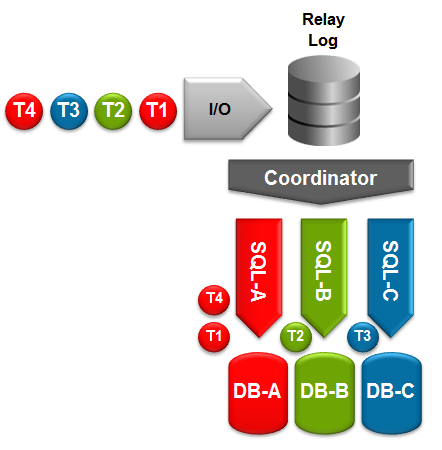
MySQL 5.6 GA – Replication Enhancements

Multi-Threaded Slave

MySQL 5.6 has now been declared Generally Available (i.e. suitable for production use). This is a very exciting release from a MySQL replication perspective with some big new features. These include:

  • Global Transaction Identifiers (GTIDs) – a unique identifier that is used accross your replication topology to identify a transaction. Makes setting up and managing your cluster (including the promotion of a new master) far simpler and more reliable.
  • Multi-threaded slaves (MTS) – Increases the performance of replication on the slave; different threads will handle applying events to different databases.
  • Binary Log Group Commit – Improves replication performance on the master.
[Read more]
DBA and Developer Guide to MySQL 5.6

MySQL is the most trusted and depended-on open source database platform in use today. As such, 9 out of the top 10 most popular and highly-trafficked websites in the world rely on MySQL primarily due to its ubiquity across heterogeneous platforms and application stacks and for its well-known performance, reliability and ease of use. MySQL 5.6 builds on this momentum by delivering across the board improvements designed to enable innovative DBAs and Developers to create and deploy the next generation of web, embedded and Cloud/SaaS/DaaS applications on the latest generation of development frameworks and hardware platforms.

What are your favorite new features in MySQL 5.6?
MariaDB in Fedora

It looks like after a 7-0 vote by the Fedora Engineering Steering Comittee, MariaDB will replace MySQL in F19.

No word from the Monty Program crew yet, but congrats to them, especially Colin Charles, and the Fedora community, especially Jaroslav Reznik and Honza Horak.

Connect to MySQL with Perl using DBI

Example of a connection to MySQL with Perl using DBI

 
#! /usr/bin/perl -w
#
#  Example code to connect to MySQL, create a table, fill it with some data and select it again.
#
#  To install DBI using cpan:
#
#  perl -MCPAN -e shell
#  cpan> install DBI
#  cpan> install DBD::mysql
#

use strict;
use DBI;

my $database = "test";
my $user = "user";
my $passwd = "secret";
my $sqlCreate = "CREATE TABLE IF NOT EXISTS test ( pkey int(11) NOT NULL auto_increment, a int, b int, c int, timeEnter timestamp(14), PRIMARY KEY  (pkey) ) ";

my $insert = "insert into test (a,b,c) values (1,2,3),(4,5,6),(7,8,9)"; 
my $select = "select a,b,c from test"; 
my $dsn = "DBI:mysql:host=localhost;database=${database}";
my $dbh = DBI->connect ($dsn, $user, $passwd) or die "Cannot connect to server\n";

# Execute the sql to create the table test
my $stmnt = $dbh->prepare($sqlCreate);
$stmnt->execute();

# Insert the testdata
$stmnt = $dbh->prepare($insert); …
[Read more]
MySQL CLI Hidden Gems

I am sure any of you that have used MySQL in the past have used the MySQL Command-Line tool (CLI). Here we will explore some of the less used CLI features that you may or may not be aware of.

Edit: In hindsight I should of called this post something like MySQL CLI Hiding Gems or Lesser Known Gems. These tools aren’t strictly hidden just not often used or mentioned.

System commands
You can use the system command to exectute shell commands without leaving the CLI


      mysql> system whoami
sam
mysql> system echo "Hello World"
Hello World
mysql> system uname
Darwin

The same can be done with \! instead of system.

Logging to file
The tee (\T) command can be used to specify an output file to log CLI output to.

[Read more]
InnoDB and an Auto_increment Edge Case

Today my colleague Matt alerted me to an issue being discussed in the Phabricator IRC channel which was caused by a MySQL edge case that might trip some people up.

The issue is to do with how InnoDB assigns auto_increment values after restart.

Lets create two simple tables and a simple example scenario that is very similar to the Phabricator issue….

Table 1 “tasks”


      CREATE TABLE `tasks` (
`id` int(11) unsigned NOT NULL AUTO_INCREMENT,
`task` varchar(30) DEFAULT NULL,
`assignee` varchar(30) DEFAULT NULL,
PRIMARY KEY (`id`)
) ENGINE=InnoDB DEFAULT CHARSET=utf8;

Table 2 “tasks_archive”


[Read more]
The Data Day, a few days: January 31 – February 4 2013

Fedora confirms MariaDB plans. IBM acquires Star Analytics. And more

For 451 clients: Metamarkets hones analytic focus on digital media, takes in-memory engine open source bit.ly/VElDqs By Krishna Roy

— Matt Aslett (@maslett) February 4, 2013

For 451 Research clients: WANdisco prepares to bring active-active replication to Hadoop bit.ly/VElEL9

— Matt Aslett (@maslett) February 4, 2013

For 451 Research clients: ScaleDB returns with database-virtualization play for MySQL bit.ly/XXt7zO

— Matt Aslett (@maslett) …

[Read more]
Showing entries 15703 to 15712 of 44962
« 10 Newer Entries | 10 Older Entries »