Once upon a time, there was a policy in MySQL not to add new
features after the beta stage.
To my surprise, MySQL Workbench 5.2.30 introduces a new feature,
the query formatter. I gave it a try. The results are not
extremely encouraging. Granted, it's a plugin and not a feature
in the core application, but nonetheless one would expect
something more stable in a GA release, especially since the
plugin features are displayed in the main menu, and unless you
have read the announcement, you couldn't easily tell the core
from the plugins.
This is what I have got in just a few minutes:
Bug #58356:
beautify function fails on CREATE TABLE
Bug #58357:
beutify function erases statement on CREATE …
Seriously, it did. Sorta.
I use Workbench for my daily work, and it’s a great tool. If you haven’t tried the 5.2 release yet, you should. While performing some maintenance, I happened to issue a DELETE statement against a table which had no indexes (it was 10 rows), and Workbench complained:
Error Code: 1175
You are using safe update mode and you tried to update a table
without a WHERE that uses a KEY column
It turns out this is a new feature in 5.2.26 (and is still there in 5.2.27) – Workbench now uses the equivalent of –safe-updates mode for the mysql command-line client (also known as the –i-am-a-dummy option – seriously). This wasn’t exactly convenient for me, …
[Read more]
MySQL Workbench is a great tool for developers to map out and
visualise databases. What many people know is that it’s also a
great way to make upgrading and writing upgrade scripts for your
components really painless too.
Let’s say you created a small component that became popular over
night. Tens of thousands of downloads from on the Joomla
Extensions Directory. So you get inspired and put some more work
into improving and bugfixing this component even more, and while
doing that you change and add on to the database schema.
Now you need to create and distribute an update script with the next version of your component, and MySQL Workbench makes creating this update script really easy. Here is what you need to do:
Install MySQL Workbench
I’ll not help you with this. Just go to the MySQL Workbench homepage and follow the instructions from there. …
[Read more]
As everyone knows, I am a command line guy. I am very much
comfortable with the shell prompt and the command line SQL
client. I do most of my work that way, and I am very much
productive.
However, there comes a time when even for a command line
enthusiast a GUI can be helpful.
Here comes the latest MySQL Workbench 5.2.
There are two areas where I feel that WB can give me a
hand:
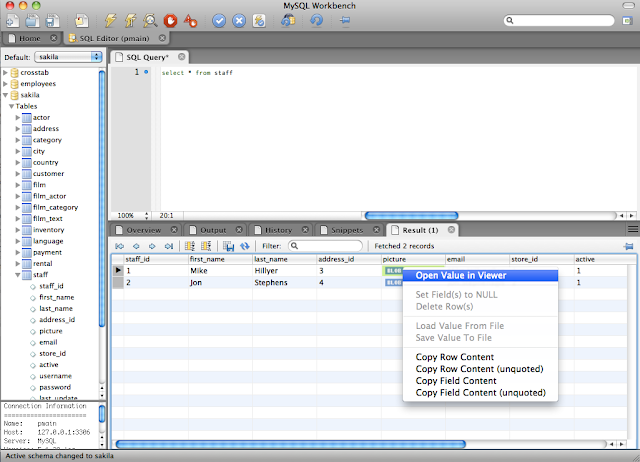
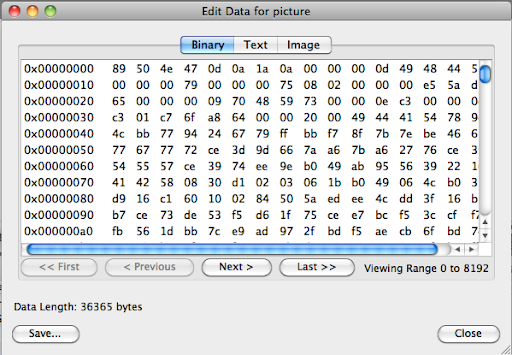
The first is when looking at tables that contain BLOB columns.
Sure I can deal with them at the command line, but this editor
makes my life easier.
When a column contains a BLOB, you can open the field
viewer.
…
Happy New Year! Monday night is the first meeting of the North
Texas MySQL Users Group for 2010! And the topic for discussion
will be MySQL Workbench.
Workbench is a tool for visual database design, schema
documentation, change management, and is replacing the old MySQL
GUI tools. If you have not tried the latest releases, you will be
for a pleasant surprise.
NorthTexasMySQL.org meets at 7:00PM sharp at
the Sun Offices, Suite 700, 16000 Dallas Tollway, Dallas TX. We
welcome all who want to know more about MySQL, databases, or Open
Source. Admission is free and I will bring cookies!
For those of you that attended today’s webinar or for those of you who were unable to do so, we discussed and demo’ed many of the new exciting features in Workbench 5.2.
The presentation slides in pdf and audio are available –
http://www.mysql.com/news-and-events/on-demand-webinars/display-od-472.html
If you are currently using MySQL Query Browser or MySQL Administrator, you’ll be pleased to know that their functionality is now in MySQL Workbench, creating a single, unified GUI for designing, developing and administering MySQL databases.
For more info visit:
- WB Downloads: http://dev.mysql.com/downloads/workbench/
- WB Forums: …
|
|
At CodeBits I had my first session about MySQL schema maintenance. I covered the basic command line possibilities before coming to the recommended tool, MySQL Workbench. The slides are available at slideshare. |
Interesting questions: ([updated] with answers from the
development team
-
[Q] Are there plans to administer MySQL Cluster with
Workbench?
[A] Not that we know of.
- [Q] Can Workbench deal with user permission maintenance across servers? (especially in cases where development and production users can't have …
|
|
|
Codebits is
approaching. Form December 3rd to 5th, this gathering of 600
developers for a conference, which is also and foremost a
competition, will occupy the mind of the best coders in
Europe. I will be a speaker, with two sessions:
|
…
[Read more]
Given the announcement earlier this week of an updated
release of the actively developed MySQL Workbench 5.2, I thought
I'd give it a quick look...
Install on Windows went without a hitch.
One thing I noticed, which I don't remember being previously
available in MySQL GUI tools, is the ability to connect to a
remote MySQL server via SSH tunneling.
Below is a screen shot:
Well done! A small, but significant addition for folks that
require SSH to connect to their systems.
I did notice that the design in Workbench involves selecting
"Standard TCP/IP over SSH" from the drop down and then providing
credentials in a more "form" oriented layout. An "SSH" tab like
we see in Navicat or SQLyog …
The easiest way to see the differences between two schemas on a non-Windows machine is to run:
mysqldump -h server1 --no-data --all-databases >
file1.sql
mysqldump -h server2 --no-data --all-databases >
file2.sql
diff file1.sql file2.sql
However, this will show also trivial differences, such as the
value of AUTO_INCREMENT. It also does not give you a
way to patch one schema to be like another.
We frequently are asked to “do a schema diff and create a script that will ‘patch’ one server.” Usually this is done to take a development or test schema and move it to production for a release.
We like to use the best tool for the job, and while diff is good, I like to use MySQL workbench. The OSS (Community) edition provides all the functionality we need for creating a schema diff and …
[Read more]