SysBench is a system evaluation benchmark designed for
identifying basic system parameters that are important for a
system running a database under intensive load.
how to use it?
1)install sysbench.
Download:
http://sourceforge.net/projects/sysbench/
./configure --prefix=/opt/sysbench_mysql47/
--with-mysql-includes=/home/oracle/mysql/include/mysql/
--with-mysql-libs=/home/oracle/mysql/lib/mysql
make
make install
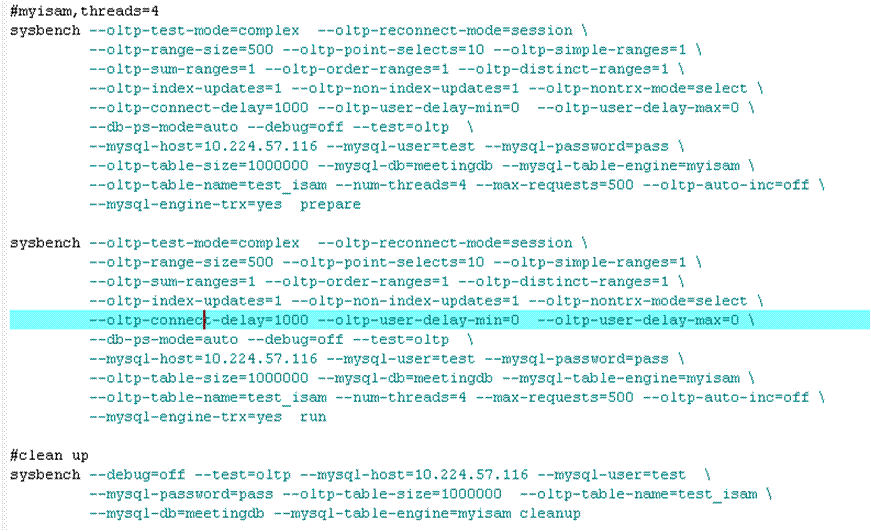
2)How to test MYSQL with sysbench?
3)Sysbench options:
…
Community journal
Follow the feed
The latest from the MySQL community
Ideas, releases, practical guides, and perspectives from the people building with MySQL.
Showing entries 2241 to 2250 of 3187
« Previous |
Next »
Jun
14
2011
Jun
14
2011
Today,select count(*) for a table,used time as following:
--first run:
select count(*) from mt_data;
+----------+
| count(*) |
+----------+
| 9750353 |
+----------+
1 row in set (1 min 14.72 sec)
--second run:
mysql> select count(*) from mt_data;
+----------+
| count(*) |
+----------+
| 9750353 |
+----------+
1 row in set (4.27 sec)
used time is too much, how to improve the select count(*)
performance ?
first,show the index for this tables, the result as
following:
Create Table: CREATE TABLE `mt_data` (
`guid` varchar(36) NOT NULL,
`orgid` int(9) NOT NULL,
`tabid` int(9) NOT NULL,
`name` varchar(128) NOT NULL,
`IsDeleted` char(1) NOT NULL,
…
Jun
14
2011
LVM is an implementation of a logical volume manager for the
Linux kernel. The biggest advantage is that LVM provides the
ability to make a snapshot of any logical volume.
In a production environment many users access the same file (file
is open) or database. Suppose you start backup process when a
file is open, you will not get correct or updated copy of
file.
Read-only partition - to avoid inconsistent backupYou need to
mount partition as read only, so that no one can make changes to
file and make a backup:
# umount /home

  # mount -o ro /home

  # tar -cvf /dev/st0 /home

  # umount /home

  # mount -o rw /home
As you see, the draw back is service remains unavailable during
backup time to all end users. If you are using database then
shutdown database server and make a backup.
Logical Volume Manager snapshot to avoid inconsistent backupThis
solution will only work if you have created …
In the previous part of this article, we had a look at how to
configure LVM, and we had successfully setup a Volume Group and
two Logical Volumes. Now we are going to have a look at extending
the group and volumes.
So let’s start the story from the previous part of this
article!
Because, the mysql volume was filling up quickly so
I decided to add a new disk of size 10 GB, and I really want to
extend the mysql volume quickly, before the MySQL
server stalls. With LVM, thats no longer an issue.
Partitioning the new diskFirst let’s have a look at the partition
table,
$ fdisk -l
The new disk is /dev/sdb, but its not partitioned,
so lets create a single partition spanning the whole disk.
We will do so using the fdisk utility,
$ fdisk /dev/sdb
which will provide you with an interactive console, that you will use to create the …
[さらに読む]
Linux LVM (Logical Volume Management) is a very important tool to
have in the toolkit of a MySQL DBA. It allows you to create and
extend logical volumes on the fly. This allows me to say, add
another disk and extend a partition effortlessly. The other very
important feature is the ability to take snapshots, that you can
then use for backups. All in all its a must have tool. Hence,
this guide will allow you to understand various terminologies
associated with LVM, together with setting up LVM volumes and in
a later part will also show you how to extend the volumes.
But first up let’s understand various terminologies associated
with LVM.
TerminologiesThere are three terminologies that you need to be
familiar with before you start working with LVM.
- Physical Volume: Physical Volumes are actual hard-disks or partitions, that you normally mount or unmount on a directory.
- …
Jun
13
2011
前回のエントリでは、真のオープンソースとは何か?と題して、LPI-Japanがオープンソースの定義を間違えているという点を指摘した。今回はさらに別の角度から、この認定試験の名前を変更するべき理由について考えてみたい。
1. オープンソースなRDBMSはPostgreSQLだけじゃないオープンソースのRDBMSと言えば、日本ではMySQLとPostgreSQLが人気を二分している。*1Googleで検索された回数であれば、MySQLのほうがやや有利だろうか。Googleの検索回数が多いからそれがどうしたと言われそうだが、日本で認知されているオープンソースRDBMSがPostgreSQLだけではないことは確かだろう。
オープンソースなRDBMSということでMySQLが使われる機会は多い。従って、上司や顧客から
…
[さらに読む]
Jun
13
2011
本番環境のトラブルシューティングで、サーバルームに缶詰になって作業することがあります。インターネットには繋がらない、ノートパソコンは持ち込み禁止、場合によっては携帯電話も持ち込み禁止、突然呼ばれたのであの本やこの本も持ってきていないという状況で、MySQLのコマンドをど忘れしたらどうすればよいでしょうか。 実はMySQLには公式サイトに掲載されているものと同じマニュアルが付属しており、infoコマンドで閲覧することができます。 $ info mysql Red Hat Enterprise Linux/CentOSのバンドル版ではmysqlパッケージ、公式バイナリではMySQL-serverパッケージにマニュアルが入っています。Info形式のマニュアルは、GNUのソフトウェアで標準的に使われているものだそうです。 操作方法をメモしておきます。 キー内容 …
[さらに読む]|
日経 Linux (リナックス) 2011年 07月号 [雑誌]
日経 Linux (リナックス) 201...の他のレビューをみる» 評価: |
JUGEMテーマ:コンピュータ
せっかくの週末をイヤ〜な気分で過ごした木村です。おはようございます。
…
JUGEMテーマ:コンピュータ
これまで以下のエントリで触れていたオープンソースデータベース技術者認定試験、並びにオープンソースデータベース技術者認定資格が実施されます。
・OSSDB界を混乱させるPostgreSQL CEの改名(OSS-DB
CE)に反対します。
・OSSDB界は混乱しなかったらしい。なら認定試験名称は「OSS-DB CE」でどうぞ。
最後のエントリでクローズして、できれば静観したかったのですが、とうとう実際に実施されるにあたり、以下の記事中のLPI-Japan殿理事長の発言に憤慨してしまい、またエントリを書くはめになってしまいました。
…
Jun
11
2011
今年も 日本MySQLユーザ会(MyNA)のブース出しとセミナー開催のために、オープンソースカンファレンス北海道(OSC2011 Hokkaido)に参画しました。 http://www.ospn.jp/osc2011-do/ MyNAとしては(もちろん私個人としても)、OSC Hokkaido へは、昨年に続く2回目の参加です。昨年会場で知り合った方と再会できたりして、2回目ならではの喜びのあったOSCでした。 OSC-Hokkaido では長めの休憩時間に「ブースツアー」というのを ...