Below video will depict :
* How to set a login path
* How to use login path in mysql client
* How to use login path in mysqldump
* How to remove login path
You can download the slides from below URL
Below video will depict :
* How to set a login path
* How to use login path in mysql client
* How to use login path in mysqldump
* How to remove login path
You can download the slides from below URL
1) Update_time not accurate in information_schema.tables
Information_schema.tables has a field called update_time and in 5.6 you will notice that it is always NULL. Future versions of MySQL will fix this problem
2) Multiple instance manager
Currently creating , managing and dropping instances in MySQL requires many DBA hours. mysqld_multi is there to help you but it requires initial configuration and there are other third party utilities that could come to your rescue
It would be better to have built in utilities to help us in this regard.. For example db2 has db2icrt that creates an instance , db2ilist to list instances and db2idrop to drop an instance
3) Quiesce database in MySQL
There is no built in quiesce option to block all activity on the database/instance. Although method mentioned in below URL will help you in doing manual quiesce …
[Read more]
There are situations when you need to update the python-paramiko
library that is bundled with MySQL Workbench. This may be
because you prefer
using the latest cutting edge versions, are just curious, or you
can’t wait for a new Workbench version.
To update, first download the latest python-paramiko release from https://github.com/paramiko/paramiko/releases. After downloading and extracting the archive, you’ll see a paramiko folder inside of the extracted folder. This folder needs to be copied into the appropriate MySQL Workbench folder on the system.
* For Windows, this location is usually
WB_INSTALLDIR/python/site-packages/paramiko
* For OS X, this will be
/Applications/MySQLWorkbench.app/Contents/Resources/Libraries/paramiko
* For Linux, you should use your repository manager (yum, apt-get, etc.), but …
[Read more]
MySQL 5.7 DMR6 was been released today! By my crude measurement,
it is a big release with a number of new features and bug
fixes:
  morgo@Rbook:~$ for V in 1 2 3 4 5 6; do curl --silent
  http://dev.mysql.com/doc/relnotes/mysql/5.7/en/news-5-7-$V.html |
  wc -l; done;

  2543

  4914 <-- DMR2

  2282

  2940

  4118

  4121 <-- DMR6
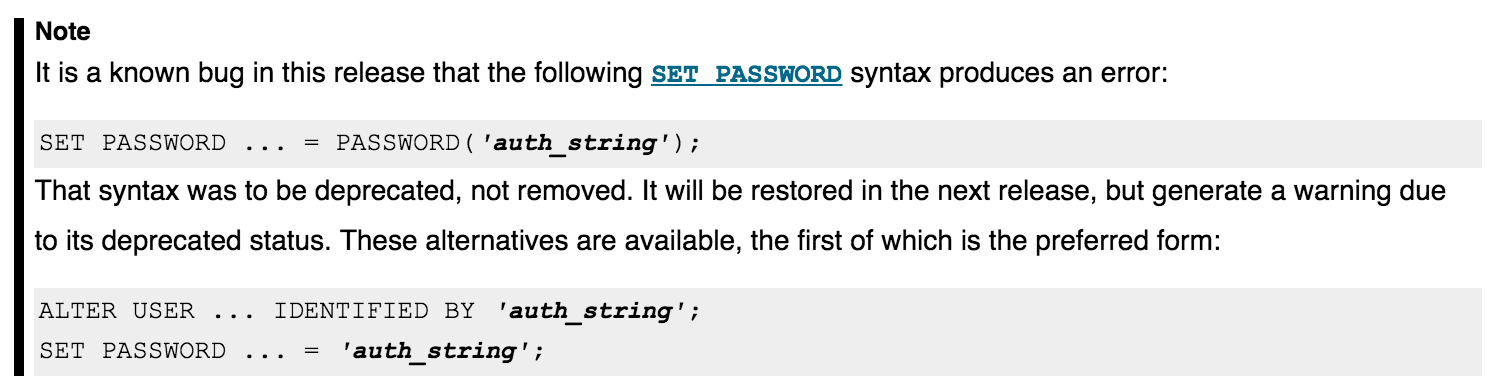
The release notes have one important known bug to note:
We are very happy to introduce a new MySQL utility named “mysqlslavetrx“, which allows users to easily skip multiple transactions on multiple servers in a single step. This utility is one of three new utilities included in MySQL Utilities release-1.6.1 Alpha. The other utilities are “mysqlbinlogpurge” and “mysqlbinlogrotate“, which can be used to purge and rotate binary logs.
The mysqlslavetrx utility allows you to skip multiple transactions on several slaves. More precisely, it injects empty transactions for the specified Global Transaction Identifier (GTID) set and list of target slaves. Skipping transactions can be useful to quickly recover from erroneous situations that can occur during the replication process, or to handle errant transactions. Check out the following blog posts for more details about concrete situations where you might need to inject empty transactions: …
[Read more]MySQL is open-source RDBMS and is gaining popularity in the recent years.. I am starting a comparison series for mysql and db2..This series will help MySQL DBAs to catchup Db2 quickly and vice versa.. Please post your feedback
1. Knowing the software version :
mysql> select version() ;
+-----------+

  | version() |

  +-----------+

  | 5.5.28 |

  +-----------+

  1 row in set (0.00 sec)
  mysql> show global variables like 'version%' ;

  +-------------------------+------------------------------+

  |
  Variable_name
  |
  Value
  |

  +-------------------------+------------------------------+

  | …
Configuration
1) Download the utilities. Python connector is a prerequisite and this needs to be installed along with mysql utilities rpm
wget http://dev.mysql.com/get/Downloads/Connector-Python/mysql-connector-python-2.0.2-1.el6.noarch.rpm
wget http://dev.mysql.com/get/Downloads/MySQLGUITools/mysql-utilities-1.5.3-1.el6.noarch.rpm
2) Install the RPMs. “Mysqlfailover –help” will confirm the install of the utilities
rpm –ivh mysql-connector-python-2.0.2-1.el6.noarch.rpm
rpm -ivh mysql-utilities-1.5.3-1.el6.noarch.rpm
3) Set the GTID MODE to ON. GTID mode is a prerequisite for mysqlfailover. GTID tracks the transaction IDs for replication instead of tracking log file and position
log-bin=1
gtid_mode=ON
enforce_gtid_consistency=true
log-slave-updates=1
4) Setup replication using …
[Read more]MySQL’s default storage engine as of version 5.5 is InnoDB. InnoDB maintains a storage area called the buffer pool for caching data and indexes in memory. By keeping the frequently-accessed data in memory, related searches are retrieved much faster than reading from disk.
When you stop or restart MySQL, you lose the cached data stored in the buffer pool. There is a feature in MySQL 5.6 which allows you to dump the contents of the buffer pool before you shutdown the mysqld process. Then, when you start mysqld again, you can reload the contents of the buffer pool back into memory. You may also …
[Read more]So how do you use MySQL Fabric to set up a Highly Available Server Farm? The last two postings in this series were on installing Fabric on a master and then setting up slaves. Now it is time to get get the Fabric Farm started.
The Fabric controller is node number 1 and the slaves are 10, 20, and 30 at IP 10.10.13.1, 10, 20, and 30 respectively. I am keeping with the last octet of the IP addresses for clarity. I am trying to recreate the Fabric Farm from this image.
On the 10, 20, and 30 systems we need to add the following to the
mysld section of the my.cnf
[mysqld]

  binlog-format=ROW

  log-slave-updates=true

  gtid-mode=on

  enforce-gtid-consistency=true

  master-info-repository=TABLE

  relay-log-info-repository=TABLE

  sync-master-info=1

  report-host=192.168.0.201

  report-port=3306

  server-id=1

  log-bin=mysql1-bin.log
Next set up replication …
[Read more]MySQL Fabric will be used set up a three node High Availability server farm and this is the second part of a series. If you missed the last post, I will be doing a live demo (gulp!) on Fabric for the Triangle MySQL User Group in Raleigh. But part of the pain of live demos is how do you get multiple servers set up to make a server farm. E-I-E-I-oh?
Of course getting the slaves up on one laptop and running
correctly is the biggest expenditure of time for this demo. For
this I will use Vagrant. I am using Vagrant to set up three
identical servers using VirtualBox to provide the servers I need
for the demo. I am using Ubuntu.
sudo apt-get install vagrant VirtualBox

  mkdir vagerant

  cd vagrant

  vagrant box add db1  …